
Start with the standards and their units
This worked example uses lead in drinking water measured by ICP-MS. Concentration is entered in µg/L and signal in kcps. The app captures label the concentration as ppb; for this dilute aqueous example the two are treated as equivalent.
| Lead (µg/L) | Signal (kcps) |
|---|---|
| 0.5 | 15.96 |
| 1 | 31.68 |
| 2 | 62.82 |
| 5 | 155.59 |
| 10 | 309.74 |
| 20 | 619.78 |
| 50 | 1568.81 |
Keeping the concentration and signal units explicit makes the fitted equation usable later. The slope here has units of kcps per µg/L; the intercept is a signal in kcps.
Check the low end, even when R² looks excellent
The unweighted fit in the capture has R² = 0.999971. Yet the 0.5 µg/L standard back-calculates 11.26% high and the 1 µg/L standard 5.77% high. A single summary statistic hides that practical problem.
For a straight line y = mx + b, back-calculate each standard as x̂ = (y − b) / m. Its relative error is 100 × (x̂ − x) / x. Review those errors across the range alongside the residuals and the method’s acceptance criteria.
The app’s Diagnosis card points to standard #1 and suggests checking preparation, the blank, the intercept and the working range. A suspect standard can be excluded without deleting its inputs, but the reason for doing so still needs to be justified.
Choose weighting to match the variability
Weighted least squares uses weights related to measurement precision. Inverse-variance weighting gives less influence to noisier observations. A 1/x model corresponds to variance proportional to concentration; 1/x² corresponds to variance proportional to concentration squared. Select a model using evidence about the response variation, not simply the most attractive result. NIST explains the rationale and the limitations of estimated weights.
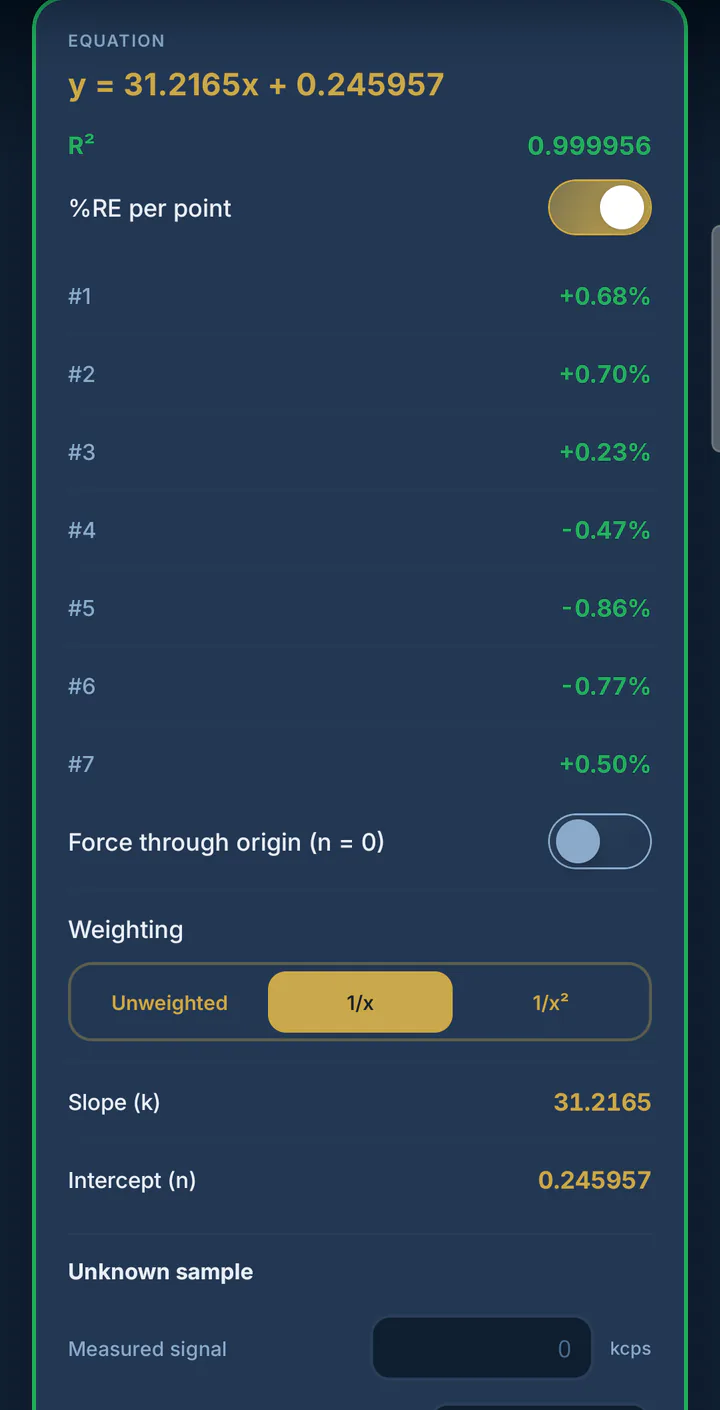
In this example, choosing 1/x produces y = 31.2165x + 0.245957. Every standard back-calculates within ±0.86% relative error. The displayed R² is 0.999956: a slightly lower number accompanies a much better low-end fit. That comparison is specific to these data, not a rule that all calibrations should use 1/x.
Calculate the unknown and keep its interval
Three sample readings average 268.8 kcps. Substituting that signal into the weighted equation gives about 8.603 µg/L. The captured LabTools result is 8.603 ± 0.128 µg/L at 95% confidence and lies inside the calibration range.
The result screen also shows s(x₀), the t value and degrees of freedom. Those details make the reported interval inspectable; the interval describes the calibration calculation and should not be mistaken for a complete uncertainty budget for sampling and sample preparation.
Next, interpret the LOD and LOQ calculated from this curve, or walk through all seven original app screens.
Use the example in LabTools
Calibration Curve is one of the free modules. It supports unweighted, 1/x and 1/x² regression, per-standard relative errors and an unknown with a confidence interval. The free version includes a one-line diagnosis; full diagnostic explanations and PDF, Excel and CSV export are part of PRO.
These values come from the real app captures used on this site. For the statistical background, see NIST’s weighted least squares reference. The example demonstrates a workflow; it does not establish acceptance limits for your laboratory’s method.